Recurring payments
A recurring payment (or repeated payment) enables you to accept a payment and debit money in the following ways:
- With a token, without involving the user, those recurring payments are called Merchant Initiated Transaction (MIT).
- Requesting 3D Secure verification from the user, those recurring payments are called Customer Initiated Transaction (CIT).
Currently, recurring payments can only be accepted from a bank card; other options will be added soon.
Recurring MIT payments
Basic steps
- Obtain the user's consent to recurring payments.
- Perform a successful payment that will recur, and get a token.
- Perform payments using this token.
User consent
Recurring payments are pre-authorized by a user and can be made without any future confirmation from them. The user only sees funds debited from their card. This is why you assume full responsibility for such payments: their amount, frequency, and user's consent to them.
You need user's consent for dispute situations (e.g. if the user complains about an unauthorized debit).
How to obtain user's consent
You can do it in any way you find convenient. The main point is that you need to verify the user had been aware of automatic debits when they made the first payment, and agreed to them.
How to do it:
- Describe the payment terms to make sure the user will read them.
- Ask the user to confirm they understand and agree to the terms (e.g. add an unambiguous checkbox like Save card, Enable automatic payments, Enable recurring donations, etc.).
If the user ticks the checkbox, thus verifying their consent, recurring payments become enabled. If they don't, recurring payments are not activated.
The checkbox can be on your side (in this case, you will decide how it looks and where it is located) or on our side—in our payment widget.
Token for recurring payments
You need to perform one payment successfully, selecting the option to save bank card details. In response to this payment, you will receive a token. This token can be saved and used to accept future payments.
How to get a token
-
When creating a payment session. Send
recurrent=true(in thepayment_optionsobject).You can do this when creating a payment session or in any payment request.
If such a payment is successfully performed, you will receive a token for recurring payments with which you will be able to repeat the payment.
In this case, you need to get the user's consent on your side beforehand.
-
In our payment widget.
If you perform a payment with the widget, you can show the I agree to recurring payments checkbox to the user.
If the user ticks this checkbox and the payment is performed successfully, you will receive the token for recurring payments.
Token statuses
When you create a token, it becomes active (is_active: true) and you can perform payments with the token.
If a token is inactive (is_active: false), the payment will not be processed and you will see an error.
To learn the token status send a token/info request. In the type parameter, pass recurrent_token, in the recurrent_token.token parameter, pass the token.
In return, you will get info with the date of token expiration (finished_at) and status (is_active). The token expiration setting (finished_at) isn't processed by Pike, i.e. the token will remain active even after the specified expiration date.
If is_active: true, you can perform payments with this token. Please note that an active token won't guarantee a successful payment, since the payment can be, for some reason, rejected by the card issuer.
How to disable a token
If you don't want to use a token for payments anymore (e.g. a user disabled recurring payments), send a recurrent/disable request.
In response, you will receive recurrent. If is_active: false, it means the token is disabled and you cannot perform payments with the token anymore.
After the token is disabled, the token expiration setting (
finished_at) may contain a date of the year 2000. This value won't affect anything, so please disregard it.
How to make a recurring MIT payment
Step 1. Successfully perform a payment with an instruction to create a token
- Without our widget
- With our widget
When creating a payment session or sending a payment request, pass true in the recurrent parameter of the payment_options object.
Example of a payment request with an instruction to create a token
curl -X POST \
  https://proxy-demo.pikepayments.com/api/v1/session/init/payment \
  -H 'Content-Type: application/json' \
  -H 'X-PARTNER-PROJECT: your_project_name' \
  -H 'X-PARTNER-SIGN: signature' \
  -d '{
    "payment_details": {
      "type": "card",
      "card": {
        "type": "bank_card",
        "bank_card": {
          "number": "4242424242424242",
          "expiration_month": "01",
          "expiration_year": "30",
          "security_code": "087"
        }
      }
    },
    "amount_details": {
      "amount": 10000,
      "currency": "usd"
    },
    "customer": {
      "reference": "lucky"
    },
    "payment_options": {
      "recurrent": true
    }
  }'
If you perform a payment with our widget, you can show the user the I agree to recurring payments checkbox.
To do this, in the widget token creation request, pass true in the show_recurrent_checkbox field.
This is optional. You can obtain the user's consent earlier, pass
recurrent: truewhen creating a payment session, and show the user the widget with no checkboxes—the same as for one-time payments.
Example of creating a token for the widget with a checkbox to agree to recurring payments
curl -X POST \
  https://proxy-demo.pikepayments.com/api/v1/token \
  -H 'Content-Type: application/json' \
  -H 'X-PARTNER-PROJECT: your_project_name' \
  -H 'X-PARTNER-SIGN: signature' \
  -d '{
    "acquiring_widget": {
      "session_id": "ps_34851",
      "show_recurrent_checkbox": true
    }
  }'
Then, create a payment form with this token.
If the user ticks the I agree to recurring payments checkbox (i.e. agrees to enable recurring debiting from their card), you will receive a token.
Step 2. Save the token
If the payment is performed successfully (and the user enables recurring debiting when paying through the form), you will get the token in the payment_finished webhook.
Example
curl -X POST \
  https://partner.ru \
  -H 'Content-Type: application/json' \
  -H 'X-PARTNER-SIGN: signature' \
  -d '{
    "type": "payment_finished",
    "session": {
      "id": "ps_3230",
      "status": "accepted",
      "created_at": "2024-05-27T02:03:00.000000Z",
      "updated_at": "2024-05-27T02:03:00.000000Z",
      "acquiring_payments": [{
        "id": "pm_2705",
        "status": "succeeded",
        "created_at": "2024-05-27T02:03:00.000000Z",
        "finished_at": "2024-05-27T02:03:00.000000Z",
        "customer": {
          "reference":"lucky"
        },
        "payment_details": {
          "type": "card",
          "card": {
            "brand": "visa",
            "last4": "4242"
          }
        },
        "recurrent": {
          "token": "feda2b2106a2e8747bbdc4c9f53c7f5f6ab845ffa1b7cc68ca839720af99b3d1",
          "created_at": "2020-07-14T13:17:11+03:00",
          "finished_at": "2020-07-31T16:05:42+03:00",
          "is_active": true,
          "type": "recurrent_token"
          },
        "amount_details": {
          "amount": 10000,
          "currency": "usd"
        },
        "payment_options": {
          "recurrent": true
        }
      }]
    }
  }'
Step 3. Accept payments using the token
Send a request to accept a payment with the recurrent payment type. Instead of a bank card, pass the token you saved after the previously accepted payment.
Example
curl -X POST \
  https://proxy-demo.pikepayments.com/api/v1/session/init/payment \
  -H 'Content-Type: application/json' \
  -H 'X-PARTNER-PROJECT: your_project_name' \
  -H 'X-PARTNER-SIGN: signature' \
  -d '{
    "payment_details": {
      "type": "recurrent",
      "recurrent": {
        "token": "e9876f32bcd947f79c324cf2da5726304a894f6ae2037de7705fdb3e0a134d39"
      }
    },
    "amount_details": {
      "amount": 10000,
      "currency": "usd"
    },
    "customer": {
      "reference": "lucky"
    }
  }'
Recurring CIT payments
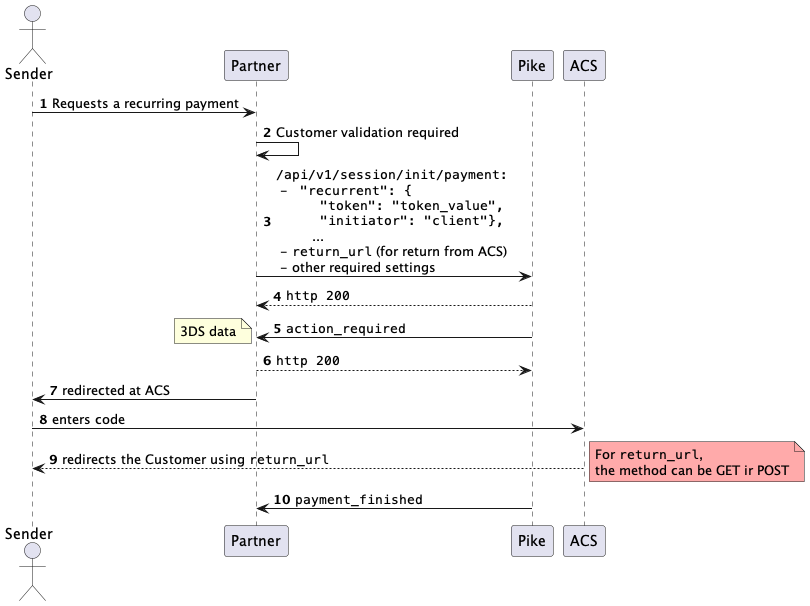
Recurring CIT (Customer Initiated Transaction) payments allow you to make payments using a token with payer verification via 3DS.
To guarantee successful CIT payments, we recommend using the project identifier intended for 3DS payments.
How to make a recurring CIT payment
-
Initiate a payment session using the
session/init/paymentmethod. In the request, provide thepayment_details.recurrent.initiator:clientvalue and specify the return URL for the payer after completing 3DS verification in thereturn_urlparameter.Example
curl -X POST \https://proxy-demo.pikepayments.com/api/v1/session/init/payment \-H 'Content-Type: application/json' \-H 'X-PARTNER-PROJECT: your_project_name' \-H 'X-PARTNER-SIGN: signature' \-d '{"payment_details": {"type": "recurrent","recurrent": {"token": "token_value","initiator": "client"}},"amount_details": {"amount": 10000,"currency": "usd"},"customer": {"reference": "lucky"},"payment_options": {"return_url": "https://pikepayments.com"}}' -
Receive from Pike an
action_requiredwebhook with the data for a redirect to the 3DS verification page.Example
curl -X POST \https://partner.ru \-H 'Content-Type: application/json' \-H 'X-PARTNER-SIGN: signature' \-d '{"type": "action_required","session": {"id": "ps_3230","status": "in_progress","created_at": "2024-05-27T02:03:00.000000Z","updated_at": "2024-05-27T02:03:00.000000Z","acquiring_payments": [{"id": "pm_2705","status": "pending","created_at": "2024-05-27T02:03:00.000000Z","customer": {"reference":"lucky"},"payment_details": {"type": "card","card": {"brand": "visa","last4": "4242"}},"amount_details": {"amount": 10000,"currency": "usd"},"amounts": {"fee": {"merchant_fee": {"amount": 10,"currency": "usd"}}},"customer_interaction": {"type": "redirect","redirect": {"url": "https://proxy.pikepayments.com?foo=bar","base_url": "https://proxy.pikepayments.com","method": "GET","qs": {"foo": "bar"},"params": {"paReq": "sdfew^//asdhbv","MD": "abc75daefnn"}}}}]}}' -
Redirect the user to the URL received in the
customer_interaction.redirect.urlfield. Pay attention to the redirection method in thecustomer_interaction.redirect.methodfield: it can be either GET or POST.Note that after completing 3DS verification, the payer will be redirected to the
return_url. Thereturn_urlmay be called using either the GET or POST method, and you may need to configure a conversion (redirect) from a POST request to a GET request. -
Wait for a
payment_finishedwebhook with the result of the recurring payment.Example
curl -X POST \https://partner.ru \-H 'Content-Type: application/json' \-H 'X-PARTNER-SIGN: signature' \-d '{"type": "payment_finished","session": {"id": "ps_3230","status": "accepted","created_at": "2024-05-27T02:03:00.000000Z","updated_at": "2024-05-27T02:03:00.000000Z","acquiring_payments": [{"id": "pm_2705","status": "succeeded","created_at": "2024-05-27T02:03:00.000000Z","finished_at": "2024-05-27T02:03:00.000000Z","customer": {"reference":"lucky"},"payment_details": {"type": "card","card": {"brand": "visa","last4": "4242"}},"recurrent": {"token": "feda2b2106a2e8747bbdc4c9f53c7f5f6ab845ffa1b7cc68ca839720af99b3d1","created_at": "2020-07-14T13:17:11+03:00","finished_at": "2020-07-31T16:05:42+03:00","is_active": true,"type": "recurrent_token"},"amount_details": {"amount": 10000,"currency": "usd"}}]}}'
Recurring CIT payment diagram