Delayed capture payments
Delayed capture payments
You can place a hold on the payment: first authorize or hold the amount of payment on the user’s card and then capture it with a separate request. There is time between the funds being put on hold and the funds being debited so you can send the order to the customer.
All in all, all payments made with bank cards consist of two key phases: authorization (when Pike verifies if the needed amount is actually available and places a hold for this amount on the bank card, essentially blocking it) and capture (when Pike clears the payment and writes off the blocked or authorized amount from the bank card balance).
There is almost no time gap between the two phases for the standard card payment flow, it looks immediate to the user.
However, if you decide to use the delayed capture payment flow, you can decide on the timing when to capture the blocked funds. In this case Pike will not capture the amount immediately, but will do so on your request.
How to enable delayed capture
Pike manages the delayed capture feature. All your payments may have immediate or delayed capture. If captured immediately, the amount of payment will be cleared automatically right after the authorization.
If you would like to perform delayed capture payments, please contact your Pike manager.
Hold period
The money is held for 3 days 23 hours. If you do not debit or unblock it before the end of this period, the money will get unblocked automatically.
If you need the money to be debited rather than unblocked after the hold period end, please contact your Pike manager.
Later capture payment scenario
- You are passing card details with open parameters
- You are using our payment widget
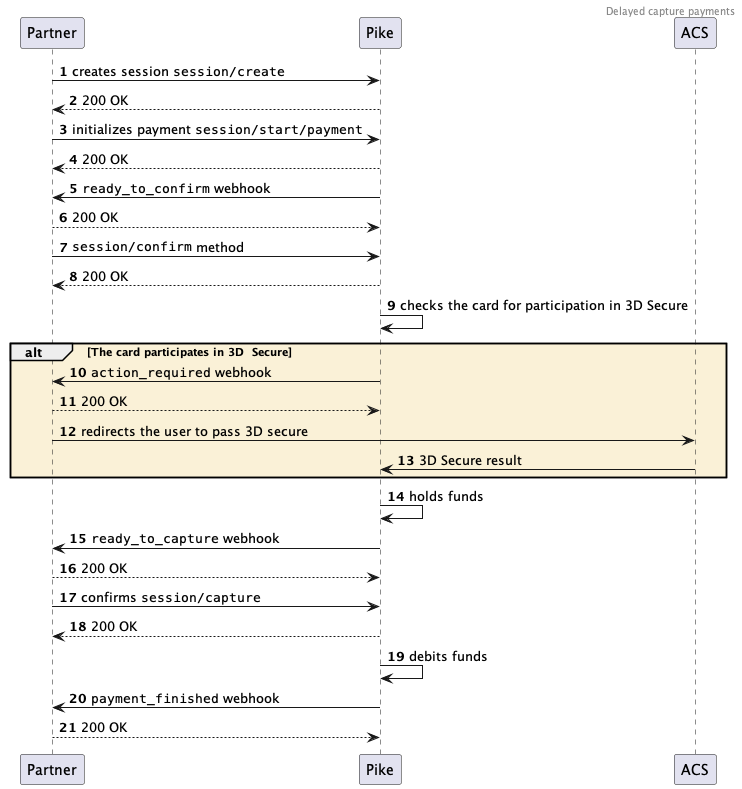
To create a delayed capture payment, complete the following steps:
- Create a payment session that is separate from the actual payment (
session/create) or a single combined session (session/init/payment). - If you have created the session separately from the start of the payment, then send a
session/start/paymentrequest. - Pike will then send you a
ready_to_confirmwebhook, which means that Pike is ready to perform the payment and is waiting for your confirmation. - Confirm (
session/confirm) or cancel (session/cancel). - If you get an
action_requiredwebhook from Pike, this means that you will need to take additional action to perform the payment. For instance, the user might need to go through 3D Secure. Redirect the user to the address for 3D Secure. - Wait for a
ready_to_capturewebhook from Pike. It means the required amount is held on the bank card successfully. It can be captured immediately or later. You can capture the full amount or a portion of it—seeamount_details. - Capture the full amount that is on hold, a portion of the amount (
session/capture), or decline the payment (session/cancel). - Wait for a
payment_finishedwebhook containing the result of the payment. If the status issucceeded, this tells you that the payment was successful.
Diagram of a delayed capture payments
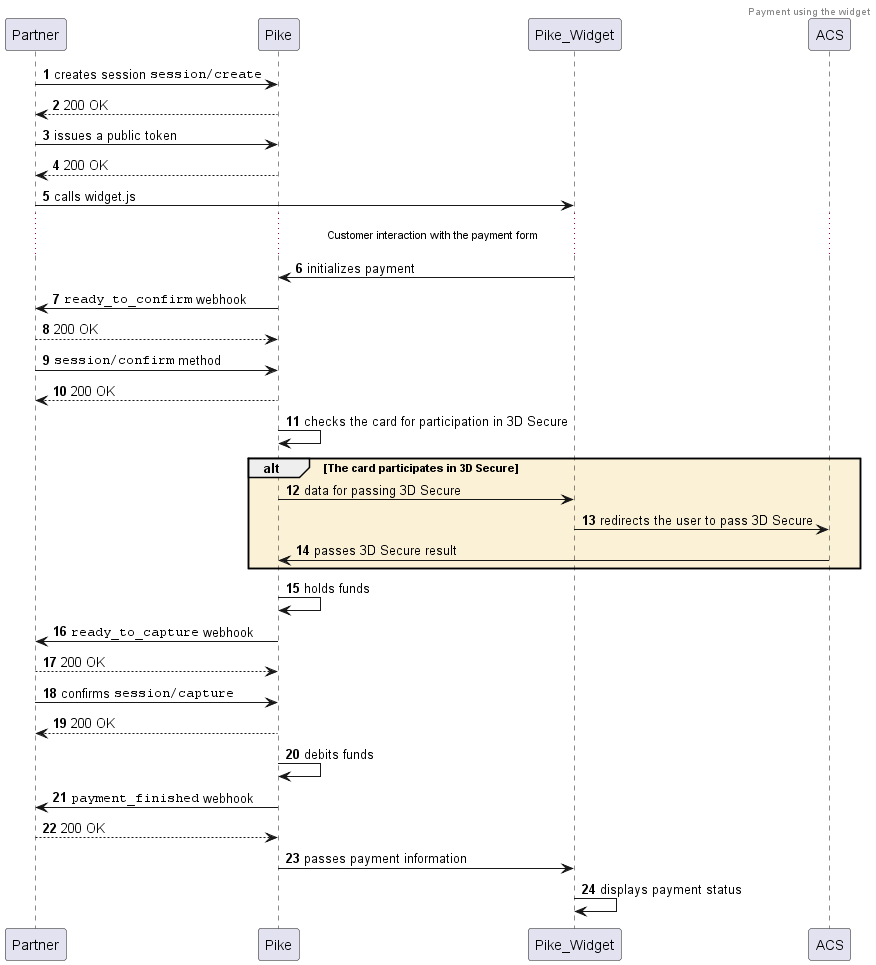
- Complete Steps 1–5.
If you receive an
action_requiredwebhook, send the HTTP 200 OK in response—the user will be redirected for 3D Secure within the widget. - Wait for a
ready_to_capturewebhook from Pike. It means the required amount is held on the bank card successfully. It can be captured immediately or later. You can capture the full amount or a portion of it—seeamount_details. - Capture the full amount that is on hold, a portion of the amount (
session/capture), or decline the payment (session/cancel). - Wait for a
payment_finishedwebhook containing the result of the payment. If the status issucceeded, this tells you that the payment was successful.
Diagram of a delayed capture payments